
The short answer: four things, in this order
When a provider joins a health plan network, collect four things in this order: the signed provider agreement, a roster of every clinician and location in the plan's required format, a W-9 with the EIN matched to the contracting entity, and then a final review that checks all three against each other before credentialing starts. The list isn't the hard part. Every contracting team knows it. The order is what decides how many follow-up emails you send, and how many rosters come back in a format nobody asked for.
Most onboarding packets ask for everything at once. It feels efficient. It isn't.
Here is what happens instead, on almost every build we've been part of. The practice manager opens the packet, sends the W-9 the same afternoon because it's already in a folder, signs nothing because the agreement is with the physician owner, and parks the roster because it's the only item that takes real work. Two weeks later you have one of four things, and it's the easiest one. Worse, it may be the W-9 for the wrong entity, because nobody has told the practice yet which entity is contracting. Sequencing fixes that. Each ask arrives when the one before it has made it answerable.
Step 1: the agreement comes first
The agreement names the contracting entity, the products and the locations. Everything after it depends on those three facts. The roster is a list of clinicians at the locations the agreement covers. The W-9 has to match the entity the agreement names. Ask for either one before the agreement is signed and you are collecting data against a moving target.
There is a regulatory reason too. For Medicare Advantage, CMS's December 2024 network adequacy guidance says plans list providers with a fully executed contract on their HSD tables. Letters of intent work only for applicants during the application. Once the plan is operational, a provider without a signed agreement is not in the network, however complete the roster looks.
The most common error at this step is a signature from someone without authority to bind the entity. Check it before you celebrate.
Step 2: the roster, in your format and nobody else's
The roster is where adequacy and your directory are both decided, so it gets the most attention. Ask for it in the plan's required format, one row per clinician per location, and give the practice three ways to send it. In the portals we build the order of preference is fixed: complete the roster directly in the portal, or download the template and fill it in, or upload a completed template. Anything else (a PDF export from the practice's scheduling system, a spreadsheet with merged cells) turns your coordinator into a data entry clerk.
These are the columns that matter, and why each one earns its place:
- Clinician name and credential. The credential drives specialty coding. For MA primary care, NPs and PAs count toward CMS's primary care group only in narrow shortage-area circumstances, per the notes in the 2026 HSD Reference File. You need to know who they are.
- Individual NPI. The clinician's own, not the group's. Validate it at intake (more on that below).
- Specialty. As the clinician actually practices, so it maps to the right adequacy code.
- Practice location and location address. CMS wants providers listed where they see patients for consultations, not where they only perform procedures, and names and addresses submitted the same way every time.
- Accepting new patients (Y/N). A directory field members rely on, and one that goes stale fastest.
- Telehealth (Y/N). Telehealth-only providers don't count toward CMS minimums, so you need the flag before the upload, not after.
- Languages. Section 422.111(b)(3)(i) requires MA plans to disclose providers' cultural and linguistic capabilities, including American Sign Language.
- Effective date. It can't be earlier than the agreement's, and it tells credentialing what order to work in.
Directories run on the same data. Section 422.120 requires the MA provider directory API to be updated no later than 30 calendar days after the plan receives new information, and the newer 422.111(m) requires updates within 30 days and an annual accuracy attestation. CMS declined to make plans attest that directory data matches their adequacy submissions. We'd still keep one roster, not two. Two rosters drift, and the drift is what a secret shopper finds (more on that in provider directories and ghost networks).
Catch the mistyped NPI before it costs you a week
The tenth digit of every NPI is a check digit, and the rule is published in CMS's NPI check digit requirements. In plain words: put 80840 in front of the first nine digits (80 for health, 840 for the United States). Starting from the rightmost digit, double every other digit. Add up all the digits, splitting any two-digit product into its two digits. The check digit is whatever it takes to reach the next multiple of ten. CMS's own example: 123456789 gets a check digit of 3, so 1234567893 is a valid NPI.
A single mistyped digit fails that check. So do most swaps of two neighboring digits. A roster form that runs it as the practice types catches the error while the person who made it is still at the keyboard, which is the only cheap time to catch it. It doesn't prove the NPI belongs to that clinician. It proves it isn't a typo, and typos are most of what you'll see.
Step 3: the W-9, matched to the entity on the agreement
Ask for the W-9 third, once the agreement tells you exactly which entity it should belong to. The current form is the IRS Form W-9 (Rev. March 2024). The number you need is in Part I, Taxpayer Identification Number. For entities it's the EIN; a sole proprietor may enter either an SSN or an EIN. The form itself says the TIN "must match the name given on line 1."
So check two matches, not one. The name on line 1 should be the legal name on the agreement, and the EIN in Part I should be the EIN the agreement was signed under. The classic miss is a W-9 from a management company, a parent or a sister practice. It's a real W-9, filled in correctly, for the wrong payee.
Step 4: a final review before credentialing starts
This is the step most teams skip, and it's the one that keeps credentialing from starting on bad data. Before a single file goes to credentialing, one person reads the three items against each other:
- The legal name on the agreement matches line 1 of the W-9.
- The EIN is nine digits and matches the agreement.
- Every roster location is covered by the agreement.
- Every NPI passes the check digit, and each is an individual NPI.
- Specialty and credential agree (an NP isn't coded as Family Practice).
- No effective date is earlier than the agreement's.
- Each clinician's credentialing profile is current. On CAQH ProView, a profile expires after 120 days without re-attestation.
Ten minutes here saves the credentialing team a returned file, which takes far longer than ten minutes to recover from. For what happens next, see how long provider credentialing takes.
The sequence on one page
| Step | What you collect | Most common error | How to catch it |
|---|---|---|---|
| 1. Agreement | Signed provider agreement naming entity, products and locations | Signed by someone who can't bind the entity | Confirm signer authority before countersigning |
| 2. Roster | One row per clinician per location, in the plan's format | Wrong format; billing or hospital address instead of the office; mistyped NPI | Structured form or template; NPI check digit at intake |
| 3. W-9 | Current IRS W-9 with the EIN in Part I | W-9 for a related but different entity | Line 1 name and EIN must match the agreement |
| 4. Final review | Nothing new; a cross-check | Skipped, so credentialing starts on bad data | One reviewer, one checklist, before any file moves |
Remind about what's missing, and stop when it arrives
Follow-up is where onboarding goes wrong in a different way. The generic reminder ("Please complete your onboarding packet") goes to a practice that sent its roster yesterday. They ignore it, then they ignore the next one, which was the one that mattered.
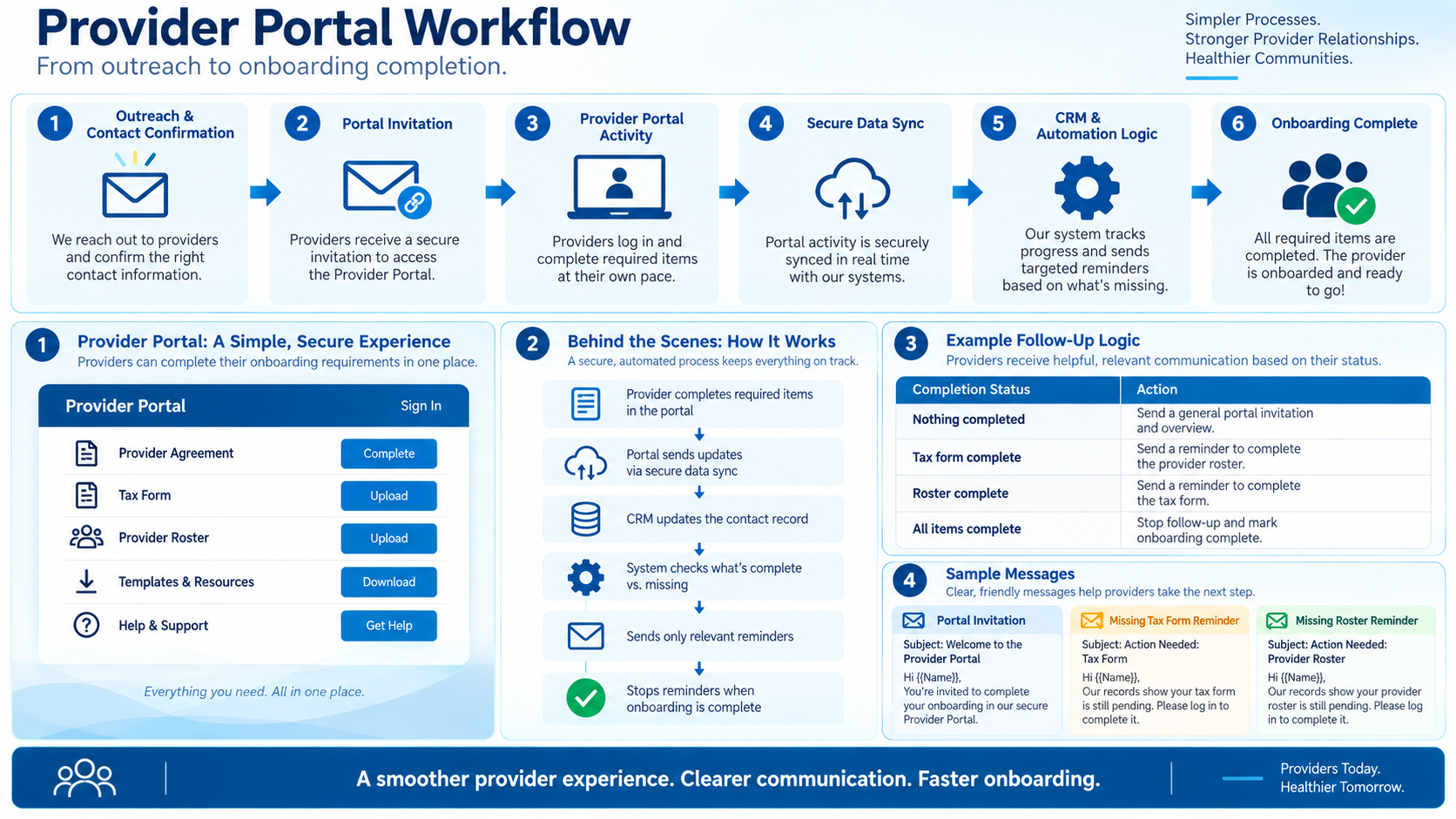
The rule is simple to say and hard to run by hand. Each reminder names the one item still outstanding. When that item arrives, reminders about it stop that day, not at the end of the week when someone updates the tracker. A practice that has done everything hears nothing but "thank you." If your team is sending reminders from a spreadsheet, they will be wrong some of the time, and every wrong one teaches the practice that your emails don't need reading. We go further into why providers go quiet in why providers don't answer recruiting outreach.
The four documents never change. What changes is whether each one arrives on the first ask, and that comes down to asking for it at the moment it makes sense to the person on the other end.
Blueprint builds custom provider portals that run this sequence, from the agreement through final review, with the reminders tied to what each practice has actually sent. It's a paid build service, from $15,000, and you can click through the ten live layouts, with fictional plans and practices, at provider portal templates.
Common questions
- What documents are needed to join a health plan network?
- Typically four: a signed provider agreement, a roster of clinicians and locations in the plan's format, a W-9 for the contracting entity, and the credentialing information for each clinician. Collect them in that order so each one can be checked against the one before it.
- What should a provider roster template include?
- At minimum: clinician name, credential, individual NPI, specialty, practice location, location address, accepting new patients, telehealth, languages and effective date. Those columns feed both network adequacy submissions and the provider directory.
- Why does a health plan need a W-9 for provider contracting?
- The W-9 gives the plan the payee's taxpayer identification number, which for entities is the EIN in Part I. The name on line 1 and the EIN should match the entity named on the provider agreement.
- How can you tell if an NPI is mistyped?
- The tenth digit is a check digit. Put 80840 in front of the first nine digits, double every other digit starting from the right, add all the digits, and the check digit is what it takes to reach the next multiple of ten. A single wrong digit fails the check.
- Should the roster come before credentialing?
- Yes. The roster tells credentialing which clinicians and locations are in scope and when they take effect. Starting credentialing before the roster and W-9 have been checked against the agreement means files come back.
Sources
- CMS, Requirements for NPI and NPI Check Digit
- IRS, Form W-9 (Rev. March 2024)
- CMS, MA and Section 1876 Cost Plan Network Adequacy Guidance (December 2024)
- CMS, 2026 HSD Reference File (updated 12/17/2025), Notes tab
- 42 CFR 422.111, Disclosure requirements (eCFR)
- 42 CFR 422.120, Access to published provider directory information (eCFR)
- CAQH Provider Data Portal, Provider User Guide
The Blueprint team
Provider network build practice
Written by the people behind Blueprint, who between them have spent 30 years building provider networks for health plans: recruiting and contracting providers, chasing credentialing, and filing adequacy. Blueprint is new. The experience behind it isn't.

